Procedure
- Measure the voltage between the ground pin and each voltage
pin (for three phase A , B ,
and C or
for single phase A and B ) on
each mainline power cable. Refer to Figure 1 or Figure 2.
Are the voltages within 10% of each other?
- Yes, continue with the next step.
- No, inform the customer that the voltages are not correct. Do not continue until the voltages are correct.
Figure 1. Three-phase delta mainline power connector at DC-UPS end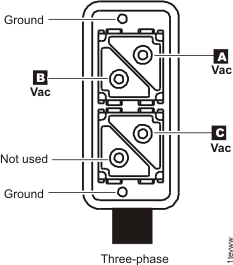 Figure 2. Single phase mainline power connector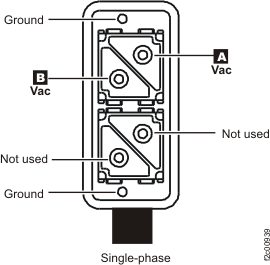
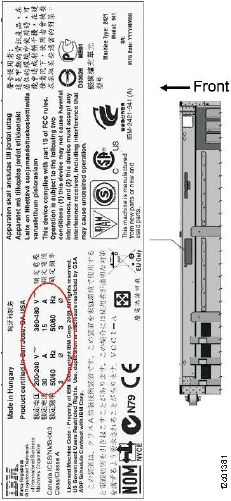
- Locate the agency label situated on the
inside front left wall of the rack, halfway from the top (near the
front of PPS E2). See Figure Figure 3. The label will
include the voltage, current, and phase specifications for this model. Measure
the voltage between each pair of voltage pins (for
three phase A to B , B to C ,
and C to A ; or for single phase A to B ) on
each mainline power cable. Refer to Figure 1 or Figure 2. Verify
that the customer AC input voltage that you just measured matches
the machine input voltage information on the label.
Does the voltage measured match the voltage on the DS8000® information label?
- Yes, continue with Connecting the mainline power cables on the racks (wired).
- No, do not continue with the installation. Contact the marketing representative to confirm that the DS8000 was ordered with the correct power input feature.
Figure 3. Agency label example (2421-941, 3-phase), with location