DS8000 Service Documentation Version 7.5
Positioning the expansion racks
Procedure
- Determine the position of each expansion rack to be installed
to this Rack-1.
- When viewed from the front of Rack-1, each expansion
rack is installed to the right. See Figure 1.
- Use each expansion rack number label
 (Figure 1) to ensure
it is for this Rack-1. The Rack-2 label must list the Rack-1 serial
number.
(Figure 1) to ensure
it is for this Rack-1. The Rack-2 label must list the Rack-1 serial
number. Attention: This storage facility installation
will fail if an expansion rack is for a different Rack-1. If the Rack-1
serial numbers do not match, stop the installation and call the next
level of support.
- Roll the expansion racks being installed into position.
Keep them about 20 cm (8 inches) apart from each other.
Figure 1. Rack serial number and
rack number labels (Models 961, 96E) (Rack-4 not shown)
- On the rear of each expansion rack being installed, remove
the right cover.
- On the upper and lower door hinges, loosen the screw 1 and
move the retention plate 2 that prevents
the hinge pin 3 from being removed. Refer
to Figure 3.
- Remove the hinge pins, remove the rear cover and place
it in a safe location.
Figure 2. Removing retaining
screws on right rear machine cover
Figure 3. Removing rear right cover
- Bolt Rack-2 to Rack-1.
Figure 4. Rack positions and connection
hardware
- Roll Rack-2 into position approximately 3" (75mm) from
Rack-1.
- In the expansion rack ship group, locate:
- 4 x spacer studs P/N 22R5046
- 7 x spacer mounting bolts P/N 1621545
- 4 x M8 washers P/N 84X5850
- See Figure 4. The
front of the rack uses two spacer studs, four bolts and four washers.
- See Figure 4. The
rear of the rack uses two spacer studs, three bolts and no washers.
- In the rear upper left corner of Rack-1, next to the
hinge, there are two holes; one above the other. See Figure 5. In the lower
hole, install a spacer stud with a mounting bolt. Leave the bolt
loose so the spacer studs can move to line up with Rack-2.
- Install the remaining three spacer studs to Rack-1.
Leave the bolts loose so the spacer studs can move to line up with
Rack-2.
- Move Rack-2 into its final position and install the
bolts and washers as shown in Figure 4.
- To access the front lower left bolt, you must temporarily
remove the battery service module enclosure cover (if present)
Note: These covers are not used on later
versions of models 961 and 96E.
- At the bottom of the cover, pull the knob out on both fasteners.
- Pull the bottom of the cover away from the BSM set.
- Lift the cover up until the two top sheetmetal tabs release from
the BSM set enclosure.
- When the alignment is correct, tighten all the bolts
that have been installed.
- Install the BSM set enclosure cover (if removed).
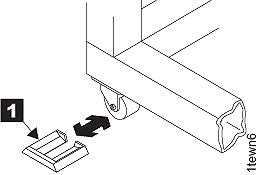
- Install the wheel chocks
 (located in the ship group) on all
four casters. See Figure 6.
(located in the ship group) on all
four casters. See Figure 6. Figure 5. Interrack spacer studs
Figure 6. Wheel (wedge) chocks
- If you are installing Rack-3, repeat the step
2 and 3 process for Rack-3.
- If you are installing Rack-4, repeat the step 2 and 3 process
for Rack-4.
- Go to the next section.
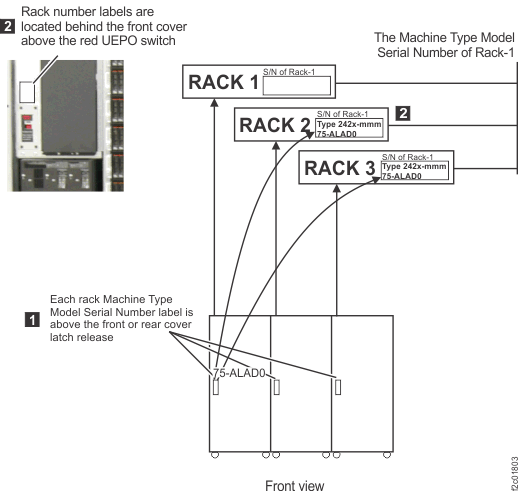
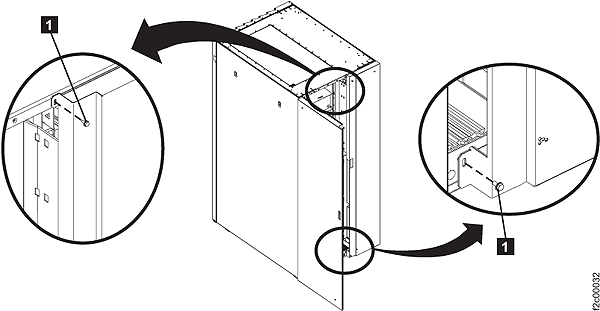 Figure 3. Removing rear right cover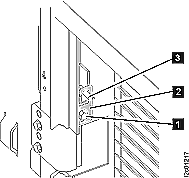
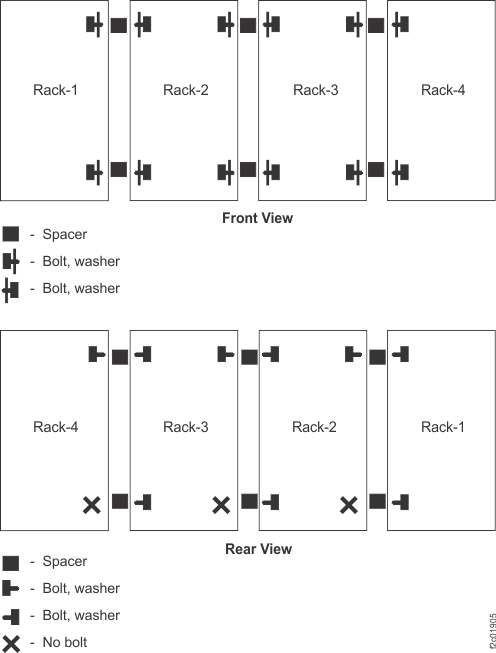
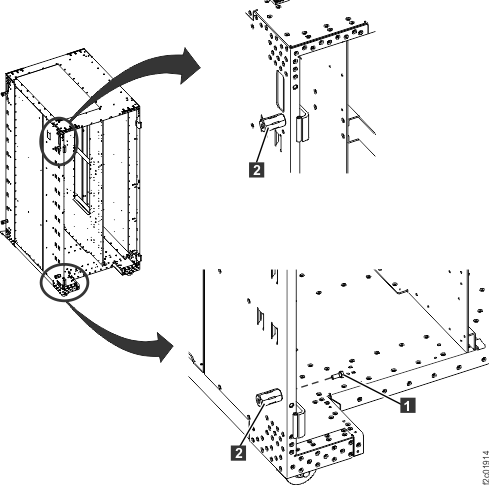 Figure 6. Wheel (wedge) chocks