About this task
DANGER
HEAVY EQUIPMENT -- PERSONAL
INJURY OR EQUIPMENT DAMAGE MAY RESULT IF MISHANDLED (D006)
Procedure
- You must ensure that each expansion rack is installed to
the base rack (Rack-1) that it was originally configured with. Note: If expansion racks for two storage facilities are accidentally intermixed, a successful installation will not be possible.
- Each rack has a small label
 with its rack S/N above the front
or rear cover latch release. See Figure 1.
with its rack S/N above the front
or rear cover latch release. See Figure 1. - Each rack has a large label
 with its rack number (position in
the storage facility) and the S/N of the Rack-1 it must be installed
to. The label is above the UEPO switch inside the front cover. See Figure 1.Note: Rack-1 may or may not list its own S/N in the S/N of Rack-1 field.
with its rack number (position in
the storage facility) and the S/N of the Rack-1 it must be installed
to. The label is above the UEPO switch inside the front cover. See Figure 1.Note: Rack-1 may or may not list its own S/N in the S/N of Rack-1 field.
Figure 1. Rack serial number and rack number labels (Models 961, 96E) (Rack-4 not shown)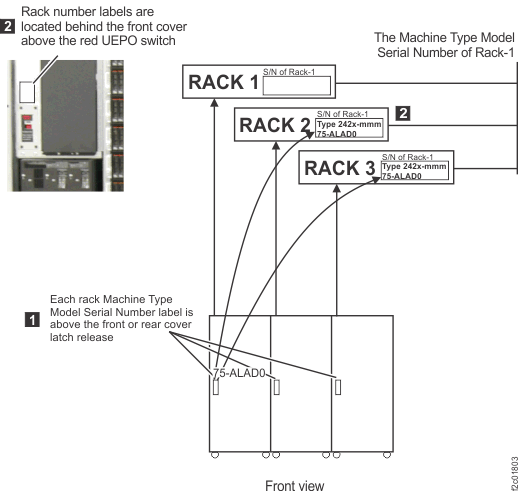
- Each rack has a small label
- Move Rack-1 to its permanent location
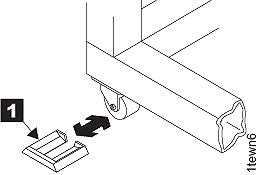
and install the wheel chocks (located in the ship group) on all
four casters. See Figure 2.
If the racks will be installed on a raised floor, position the rack
so the rear tailgate, especially the rightmost opening for the mainline
power cables, is directly over the floor tile cutouts. Note: If the storage facility is configured for overhead cable management (top exit), floor tiles with cutouts may not be required. Refer to step 6 in Checking final preparations.Figure 2. Wheel (wedge) chocks
- On each rack being installed, open the front
and rear covers.
- Open the right rear cover (trained service personnel
access area only). Remove the two screws . See Figure 3 Note: The screws must be reinstalled when the cover is closed to prevent customer access.
Figure 3. Removing retaining screws on right rear machine cover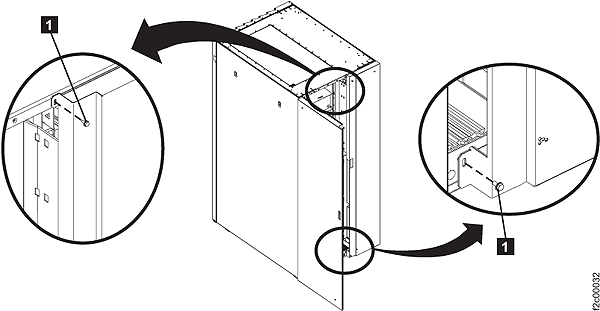
- Open the right rear cover (trained service personnel
access area only). Remove the two screws
- On each rack being installed, to access
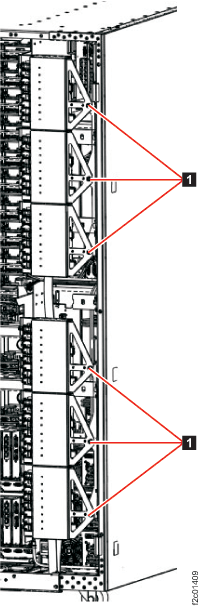
the rear of the DC-UPS, unfasten and then rotate the upper and lower
sets of power distribution units (PDUs) away from the rear of the DC-UPS, as shown
in Figure 4. Figure 4. Power distribution units in normal position (rack rear view)
- Is Rack-1 a DS8870 All Flash
storage facility shipped with a top exit tailgate for host cables?
- Yes, go to 11
- No, go to the next step.
Figure 5. Removing top tailgate cover plate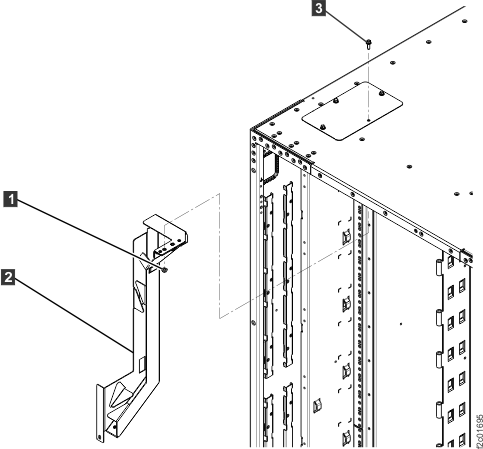
- Does Rack-1 or Rack-2 have an upper "funnel" bracket 2 at
the rear top left of the rack? See Figure 6.
- Yes, go to the next step.
- No, go to step 12.
Figure 6. Removing top tailgate cover plate - The screw is installed from the top of the rack.
Install the screw from inside the rack and then install the top tailgate.
- Go to step 12. Figure 7. Top tailgate
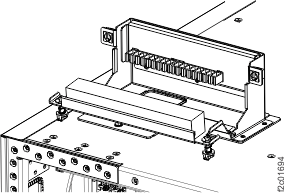
- Go to step 12.