DS8000 Service Documentation Version 7.5
Disconnecting the flash PCIe cables in the rack being installed
Procedure
- Are you installing Rack-2?
- Yes, go to the next step.
- No, go to step 5.
- Does Rack-2 contain one or more high-performance flash
enclosures in locations B04, B03, B02, or B01? See Figure 1.
- Yes, go to the next step.
- No, go to step 5.
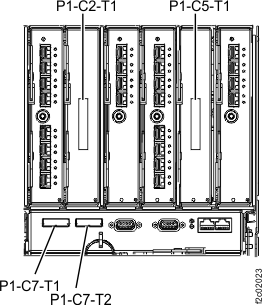
- At the rear of Rack-2, disconnect the PCIe cables from
all I/O enclosure PCIe storage interface cards, R2-XIn-P1-C2 and R2-XIn-P1-C5.
See Figure 1 and Figure 2. These
cables are reconnected later when the flash enclosures are installed.
Attention: Do not disconnect PCIe cables
from the I/O enclosure PCIe/SPCN cards, R2-XIn-P1-C7-T1 and T2.
Figure 1. PCIe cable connections
(standard configuration, Rack-2, rear) (Models 961/96E)
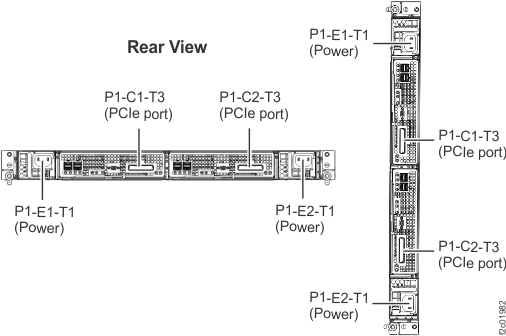
Figure 2. I/O enclosure PCIe cable
locations (rear)
- At the rear of Rack-2, gently push on each PCIe cable connected
to storage enclosure RAID controller cards C1 and C2 in R2-B04, R2-B03,
R2-B02, and R2-B01 to ensure they are connected. See Figure 1 and Figure 3.
Figure 3. RAID controller card connections
- Go to the next section.
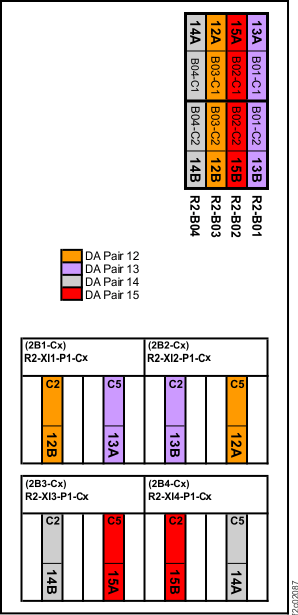 Figure 2. I/O enclosure PCIe cable locations (rear)