DS8000 Service Documentation Version 7.5
Determining the rack version (1 or 2)
Procedure
- Determine the version of the rack you are installing.
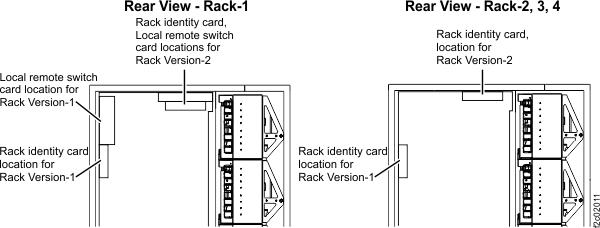
- At the rear of Rack-1, observe the location of the rack identity and local remote switch cards. See Figure 1.
- Version 1, the cards are vertical and mounted to the left sidewall.
- Version 2, the cards are horizontal and mounted to the top of the rack.
Figure 1. Identifying rack version
1 versus version 2
- In later sections, you will be asked which rack version you are installing. Record the version here _________.
This document provides installation support for both versions.
- Go to the next section.