About this task
Note: If an FC-AL cable is damaged, you can
use the point-to-point cabling diagrams to determine the other end
of the cable. See Point-to-point cabling diagrams - FC-AL cables.
Several FC-AL cables are tightly bundled together so it is extremely
difficult to physically trace an individual FC-AL cable from end to
end.
Procedure
- At the rear of the expansion rack being
installed, you must disconnect the FC-AL cables, if any, that go to T3 and
T4 connectors on every storage enclosure FCIC card. See Figure 1. Figure 1. Storage enclosure connections
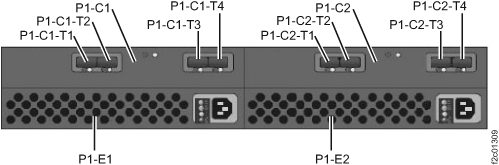 Note: You must do this now to ensure that each storage enclosure in the expansion rack can be physically cabled and logically installed one at a time. If these FC-AL cables are left connected, in later steps some of the storage enclosures will be discovered too early in the installation process which may cause problems that require the next level of support.
 - If you are installing Rack-2, at the bottom rear
of Rack-2, you must disconnect all FC-AL cables that are connected
to the device adapter card (slots C3 and C6) connectors in the I/O
enclosures. They will be reconnected in a later step.
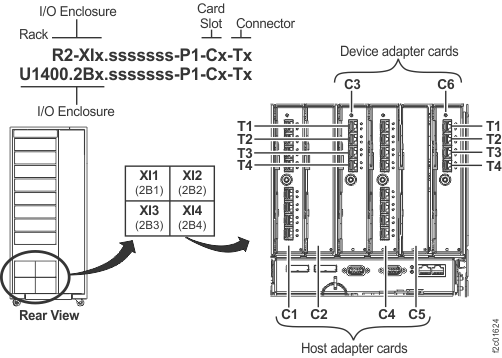
See Figure 2 and Figure 3. Note: If you are installing a business class Rack-2, step 2 does not apply. There will be no Rack-2 FC-AL cables connected to device adapter card connectors in the Rack-2 I/O enclosures.Figure 2. Rack 1-4 storage enclosure and I/O location codes (rear view)
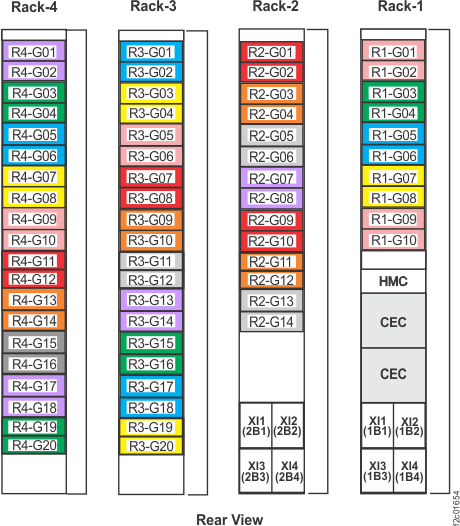 Figure 3. I/O enclosure locations and device adapter card slot locations