DS8000 Service Documentation Version 6.3.3
Unused connectors
This section describes the unused connectors in the IBM® DS8000® series. If the storage facility is being installed in the Taiwan geography, review this section for information about the cable connectors that are not used.
CEC enclosure control panel
Table 1 describes the
unused connector shown in Figure 1.
Figure 1. CEC enclosure control panel
- unused connectors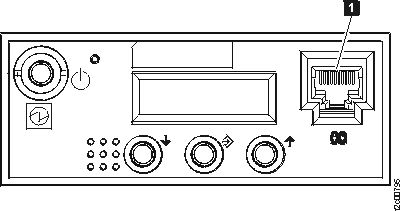
| Index | Unused Connector | Quantity (Minimum/Maximum) | Description |
|---|---|---|---|
| 1 | Ethernet | 2 | The network connection is through the HMC. The RJ45 network connectors on the two 9117's are not used by the DS8000. |
CEC enclosure, front
Table 2 describes
the unused connectors in Figure 2.
Figure 2. CEC enclosure (front) - unused
connectors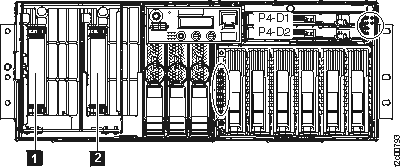
| Index | Unused Connector | Quantity (Minimum/Maximum) | Description |
|---|---|---|---|
| 1, 2 | System processor card expansion bus |
2/4 | The front system bus connectors are used to attach multiple 9117's on the same bus to increase the number of processors. The 9117's in the DS8000 are used for redundancy only and will never be connected in parallel. Use of these connectors is not supported by the DS8000 and will cause system failures if connected. |
CEC enclosure, rear
Table 3 describes
the unused connectors shown in Figure 3.
Figure 3. CEC enclosure (rear) - unused
connectors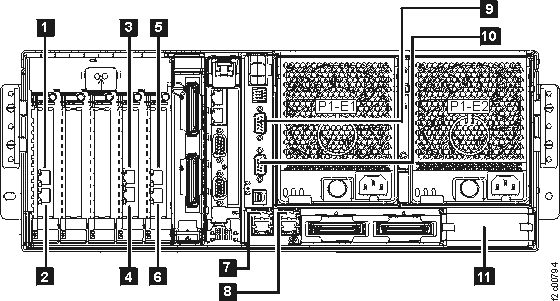
| Index | Unused Connector | Quantity (Minimum/Maximum) | Description |
|---|---|---|---|
| 1, 2, 3, 4, 5, 6 | Ethernet port | 0/4 | The DS8000 supports Ethernet network adapters for system partitioning, but only in a LPAR system configuration. |
| 7, 8, 9, 10 | USB/serial port | 4/4 | The 9117's are redundant controllers for the DS8000. The USB and serial ports of the 9117's are not supported in the DS8000 operating system and will cause system errors if connected. |
| 11 | External system bus | 2/2 | The front system bus connectors are used to attach multiple 9117's on the same bus to increase the number of processors. The 9117's in the DS8000 are used for redundancy only and will never be connected in parallel. Use of these connectors is not supported by the DS8000 and will cause system failures if connected. |
I/O enclosure, slots
Figure 4. I/O enclosure
slots - unused connectors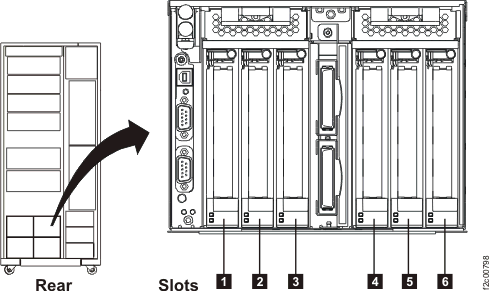
I/O enclosure, device adapter card
Table 4 describes the unused connectors shown in Figure 5.
Figure 5. I/O enclosure - unused connectors
for device adapter cards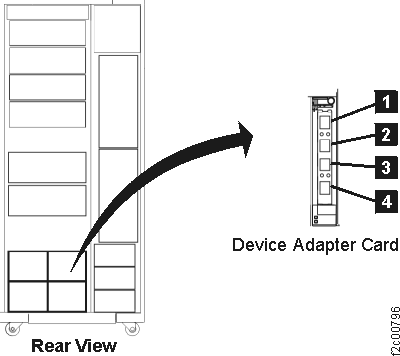
| Index | Unused Connector | Quantity (Minimum/Maximum) | Description |
|---|---|---|---|
| 1, 2, 3, 4 | Fibre channel arbitrated loop port | 4/4 | The device adapter (DA) cards are plugged in slot 3 or 6 of the I/O enclosure Figure 4. The number of DA cards varies with the installed features. DA card ports 1/2 and 3/4 are each an FC-AL loop. Both ports for a loop will have cables if there are storage enclosures installed using those ports. Both ports for a loop can also be unused and available for potential future use. It is not necessary to externally terminate unused ports. |
I/O enclosure, Fibre Channel host card
Table 5 describes
the unused connectors in Figure 6.
Figure 6. I/O enclosure,
unused connectors Fibre Channel host card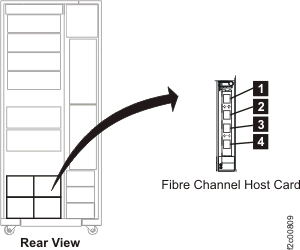
| Index | Unused Connector | Quantity (Minimum/Maximum) | Description |
|---|---|---|---|
| 1, 2 | Fibre channel host connection port | 0/64 | The Fibre Channel host adapter cards are plugged in slot 1, 2, 4, or 5 of the I/O enclosure Figure 4. The number of Fibre Channel host cards varies with the installed features. The customer provides Fibre Channel host cables and determines how many ports to use. It is not necessary to externally terminate unused ports. |
x336 management console (HMC), front view
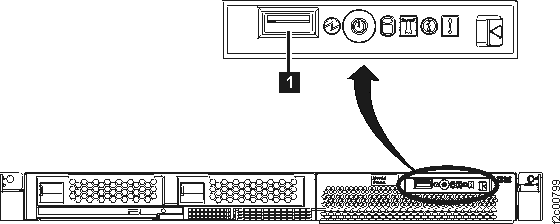
| Index | Unused Connector | Quantity (Minimum/Maximum) | Description |
|---|---|---|---|
| 1 | USB port | 2 | DS8000 has one network connection. Cable entry to the DS8000 is from the rear of the system. Therefore, the network connection is to the rear of the HMC and this connector is not used. |
x336 management console (HMC), rear view
Table 7 describes the unused
connectors in Figure 8.
Figure 8. x336 rear
view - unused connectors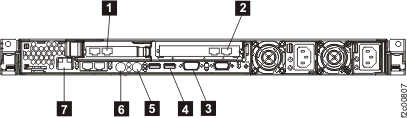
| Index | Unused Connector | Quantity (Minimum/Maximum) | Description |
|---|---|---|---|
| 1 | Ethernet port | 2 | The PCI Ethernet card has two ports; only one is needed for the DS8000. |
| 2, 4, 5, 6, 7 | USB/Modem phone port | 2 | The rear Ethernet, firewire, serial, RS232, mouse, and keyboard of the HMC are unsupported in the application of the 8837 and not supported by DS8000 system hardware. |
| 3 | Proprietary outgoing multi-drop keyboard/display port | 2 | Not used for DS8000. The incoming port is used, but since there are no multiple display connections, the outbound port is not needed. |
Rack power and cooling, RPC card
Table 8 describes
the unused connectors in Figure 9.
Figure 9. RPC card -
unused connectors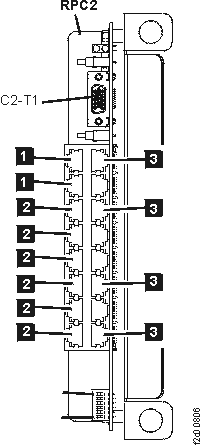
| Index | Unused Connector | Quantity (Minimum/Maximum) | Description |
|---|---|---|---|
| 1 | Rack power control port | 4 | Only used if optional expansion racks 1 or 2 are installed. |
| 2, 3 | Rack power control port | 10 | Reserved for potential future use. A system error may occur if cables are connected to any of these ports under the current configuration. |
Rack power and cooling, rack ID card
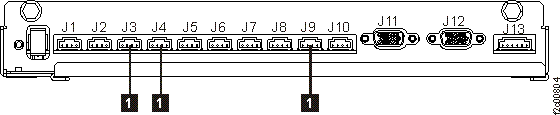
Rack power and cooling, fan sense card
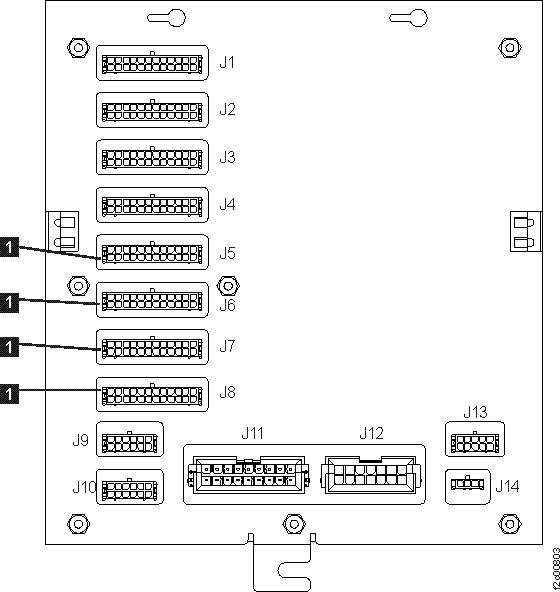
| Index | Unused Connector | Quantity (Minimum/Maximum) | Description |
|---|---|---|---|
| 1 | Fan sense control signals port from storage enclosures | 8 | Not used on a base rack (first rack). Ports are used in an expansion rack depending on how many optional storage enclosures are installed in the bottom half of the rack. |
Rack power and cooling, primary power supply
Table 11 describes
the unused connectors in Figure 12.
Figure 12. Primary power
supply - unused connector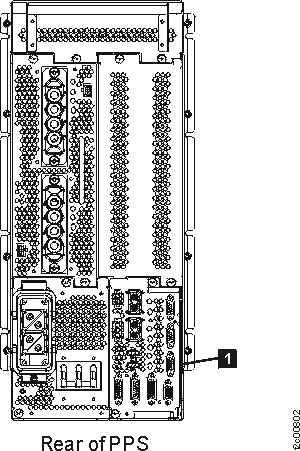
| Index | Unused Connector | Quantity (Minimum/Maximum) | Description |
|---|---|---|---|
| 1 | Signals to rack ID card | 2 | Cables are connected for expansion racks only. |
Storage enclosure
Table 12 describes
the unused connectors in Figure 13.
Figure 13. Storage enclosure
- unused connectors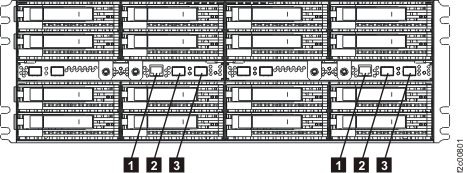
| Index | Unused Connector | Quantity (Minimum/Maximum) | Description |
|---|---|---|---|
| 1 | Card build test port | 2 per storage enclosure | Used for card build test or debug port. |
| 2, 3 | Fibre channel arbitrated loop | 4 per storage enclosure | The Fibre Channel in the storage facility is configured in strings. The ends of the strings will always be open. Connecting cables will cause system errors. |
Ethernet switch
Table 13 describes
the unused connectors in Figure 14.
Figure 14. Ethernet switch -
unused connectors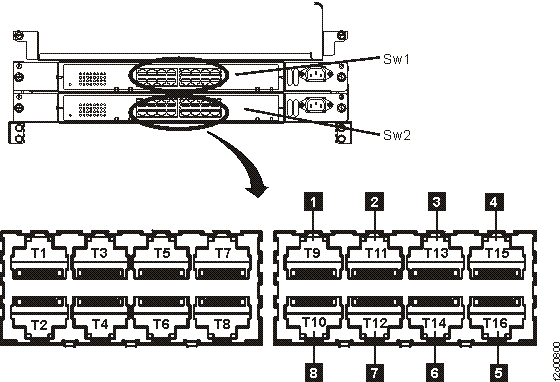
| Index | Unused Connector | Quantity (Minimum/Maximum) | Description |
|---|---|---|---|
| 1, 2, 3, 4, 5, 6, 7, 8 | Ethernet port | 12 | Reserved for potential future use. A system error may occur if cables are connected to any of these ports under the current configuration. |