DS8000 Service Documentation Version 6.3.3
ThinkPad T510 and T520 laptop servers LED indicators
This section contains information about LEDs that are on the T510 and T520 laptops. This information is also in the ThinkPad T510, T510i, and W510 Hardware Maintenance Manual and Hardware Maintenance Manual ThinkPad® T520, T520i, and W520, which are included on the service documentation CD that is part of the ship group. The CD should be stored in the document box at the front upper left corner of Rack-1. Although the condition of LEDs might indicate a failure, the LEDs should not be used as a starting point for a repair.
Status indicators
The system status indicators,
shown in Figure 1,
show the status of the computer. Table 1 lists the definitions
of the status indicators.
Figure 1. Status indicators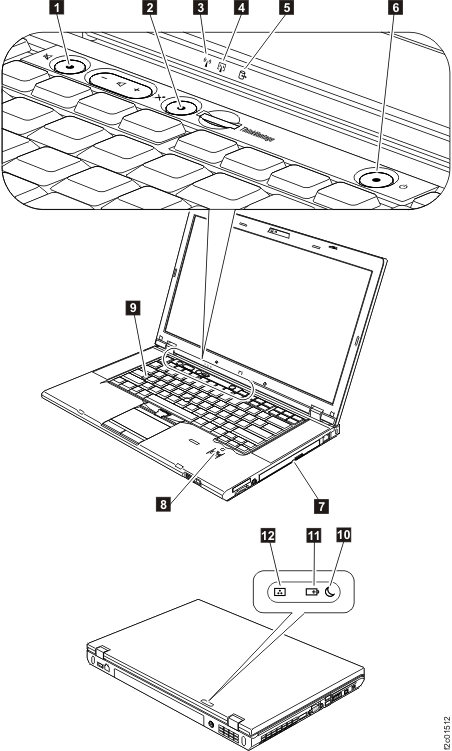
| Status indicator | Definition |
|---|---|
 Speaker mute Speaker mute  |
|
 Microphone mute Microphone mute  |
|
 Wireless LAN, Wireless WAN, or WiMAX
status Wireless LAN, Wireless WAN, or WiMAX
status  |
|
 Bluetooth wireless or Wireless USB
status Bluetooth wireless or Wireless USB
status  |
|
 Device access Device access |
|
 Power on Power on  |
|
 Serial Ultrabay Enhanced device status Serial Ultrabay Enhanced device status |
|
 Fingerprint reader status Fingerprint reader status  |
|
 Caps lock Caps lock |
|
 Sleep (standby for Windows XP) status Sleep (standby for Windows XP) status |
|
 Battery status Battery status |
|
 Color sensor status Color sensor status  |
|