DS8000 Service Documentation Version 6.3.3
Removing storage enclosure orange shipping brackets
Procedure
- If there is an orange
shipping bracket at the rear of a storage enclosure, remove it.
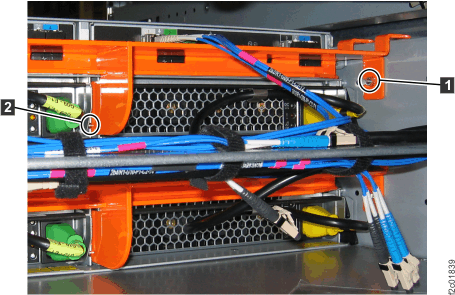
- At the rear of the rack, remove the nylock nut 1 that attaches the orange shipping bracket to the left and right horizontal rails. See Figure 1.
- Slide the bracket away from the storage enclosure so the middle support cross pin 2 disengages from the slot. See Figure 1.
- If possible, store the brackets and nylock nuts for future use when the rack is shipped back to IBM® or another destination.
Figure 1. Storage enclosure shipping bracket