DS8000 Service Documentation Version 6.3.3
MAP6010 Displaying the HMC MAC address for the customer connection
Use this procedure to help the customer determine the Media Access Control (MAC) address of the HMC port they will connect to before the physical connection is made.
MAP6010 Section-1
About this task
Find the management console hardware
that you have:
- xSeries 335, 336 or 3550, go to MAP6010 Section-2, xSeries 335, 336, or 3550.
- ThinkPad laptop, go to MAP6010 Section-3, ThinkPad laptop.
MAP6010 Section-2, xSeries 335, 336, or 3550
About this task
The xSeries HMC has a total of four Ethernet ports, two
integrated as part of the HMC motherboard, and two additional ports
on the PCI Ethernet card. See Figure 1 (x335 server) or Figure 2 (x336 server) or Figure 3 (x3550 server).
- eth0 - port for DS8000 private network (not displayed)
- eth1 - port unused
- eth2 - port for customer connection
- eth3 - port for DS8000 private network (not displayed)
Figure 1. Ethernet connectors on the rear of the X335 management console server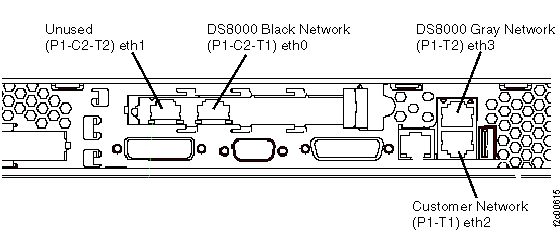
Figure 2. Ethernet connectors on the rear of the X336 management console server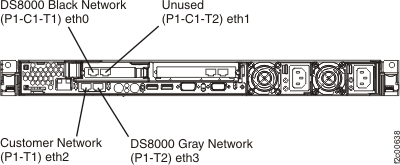
Figure 3. Ethernet connectors X3550 management console server (rear view)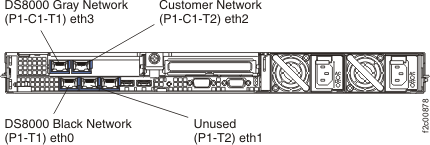
The HMC utility to display the LAN Adapters has been modified to only display the properties for eth1 and eth2. eth0 and eth3 ports are automatically managed by the DS8000® network management processes during install and FRU replacements.
MAP6010 Section-3, ThinkPad laptop
About this task
The laptop HMC
has three Ethernet ports: two use Ethernet-to-USB converters, and
one is integrated in the laptop. For the ThinkPad W500 laptop, see Figure 4. For the ThinkPad T510 laptop or
T520 laptop,
see Figure 5.
- eth0 - port for DS8000 private network (not displayed), USB ethernet adapter, USB cable connects to laptop USB port
- eth2 - port for customer connection, an extender cable runs to the rear of the rack to the customer connector
- eth3 - port for DS8000 private network (not displayed), USB ethernet adapter, USB cable connects to laptop USB port
Figure 4. ThinkPad W500 laptop network
and modem ports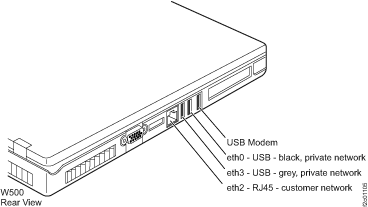
Figure 5. ThinkPad
T510, T520 laptop network and modem ports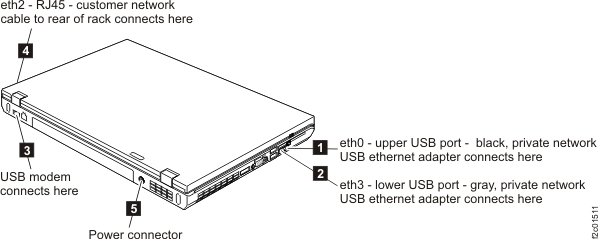
The HMC utility to display the LAN adapters has been modified to only display the properties for eth1 and eth2. eth0 and eth3 ports are automatically managed by the DS8000 network management processes during install and FRU replacements.
MAP6010 Section-4, Display the MAC address
Procedure
Display the MAC address of the port for customer connection.