DS8000 Service Documentation Version 6.3.3
MAP4050 Switching off the CEC enclosure system attention indicator (lit solid)
If the system attention indicator (LED) that is on the CEC enclosure is lit solid, use this procedure to switch it off. This is the same indicator that identifies the CEC enclosure for a FRU replace when it is flashing.
MAP4050 Section-1
Procedure
- Observe the system
attention indicator (LED) 1 on the front
of the CEC enclosure. See Figure 1. Find
the condition that applies:
- The LED is lit solid (attention). One or more serviceable events needing repair exist. Go to the next step.
- Off, the condition does not exist at this time. Return to the procedure that sent you here.
Figure 1. CEC enclosure system attention LED indicator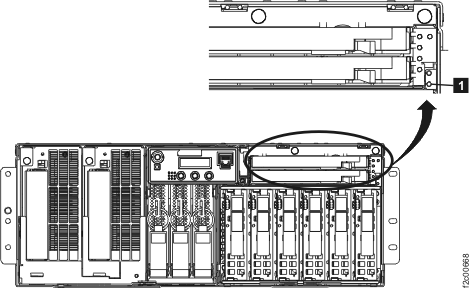
- Turn off all of the attention LEDs (which will turn off
the CEC enclosure system attention LED).
- From the navigation area, click .
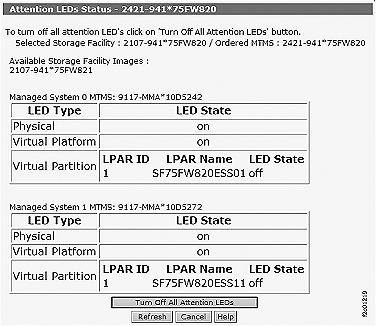
- From the bottom Task area, click . The Attention LEDs Status window opens. See Figure 2. Notice that the status for both of the managed systems (CEC enclosures) is displayed.
- Click Turn Off All Attention LEDs.
Figure 2. Window: Attention LEDs Status (applies to all models)