DS8000 Service Documentation Version 6.3.3
MAP1600 If earthquake resistance kit parts prevent you from servicing a rack
You are servicing a rack that is equipped with the optional earthquake resistance kit feature that includes braces on the front and rear of the rack. If a kit part prevents you from servicing the rack, use this MAP to remove it and then reinstall afterwards.
Procedure
Use Table 1 to
find the earthquake resistance kit part that you need to remove. For
help with the part names, see Figure 1 and Figure 2.
| To remove this part ... | Go to ... |
|---|---|
| Front of rack | |
| Brace extension frame | MAP1600 Section-1 (Brace extension frame, front) |
| X-brace | MAP1600 Section-2 (X-brace, front) |
| Rear of rack | |
| Brace extension frame | MAP1600 Section-3 (Brace extension frame, rear) |
| Tailgate access brace | MAP1600 Section-4 (Tailgate access brace) |
| Vertical brace | MAP1600 Section-5 (vertical brace, rear) |
| V-brace | MAP1600 Section-6 (V-brace, rear) |
| Storage enclosure (Models 951, 95E) earthquake resistance bracket, rear | MAP1600 Section-7 (Storage enclosure [Models 951, 95E] earthquake resistance bracket, rear) |
Figure 1. Earthquake resistance kit braces
at the front of the rack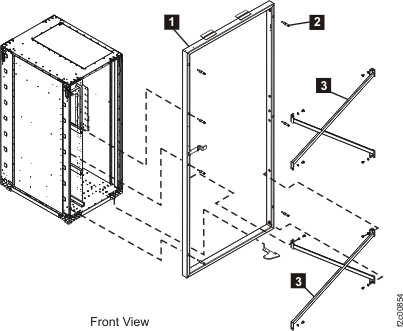
| Index | Part name |
|---|---|
| 1 | Brace extension frame |
| 3 | X-brace |
Figure 2. Earthquake resistance kit braces
at the rear of the rack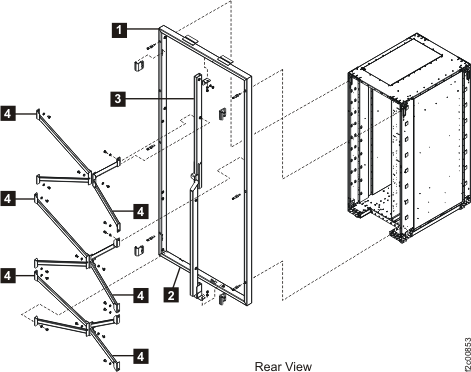
| Index | Part name |
|---|---|
| 1 | Brace extension frame |
| 2 | Tailgate access brace |
| 3 | Vertical brace |
| 4 | V-brace |
MAP1600 Section-1 (Brace extension frame, front)
Before you begin
Warning: The assembly that consists of the brace
extension frame and X-braces weighs 21.5 kg (47.3 lb). This weight exceeds the safe lifting limit
for a single service representative. Removal of this assembly requires two service representatives.
The brace extension frame alone weighs 17.0 kg (37.4 lb). If another service representative is not
available, you can remove the X-braces from the brace extension frame to lighten it and then remove
the brace extension frame.
Procedure
- Remove seven screws
 that secure the brace extension frame
  to the rack. Note: Earlier frames have pre-threaded holes and later frames have the removable nut that will be loose once the screw is removed.
 - Remove the brace extension frame and X-braces
 as an assembly. See Figure 3.
Example
Figure 3. Earthquake
resistance kit parts at the front of the rack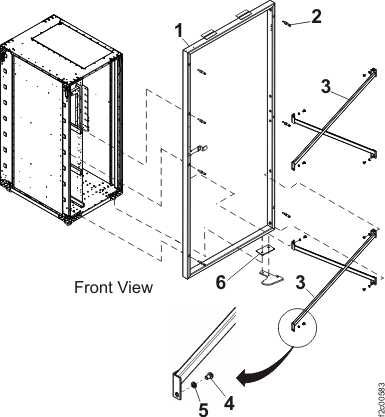
| Index | Part name |
|---|---|
| 1 | Brace extension frame |
| 2 | Screw |
| 2a | Nut, earthquake resistance frame (only present if frame does not have pre-threaded holes) |
| 3 | X-brace |
| 4 | Screw |
| 5 | Washer |
MAP1600 Section-2 (X-brace, front)
Before you begin
Procedure
- Remove four screws
 and four washers
  that secure the X-brace to the brace extension frame and then remove the X-brace. See Figure 3.
 - After the service action is complete, you must reinstall all hardware that was removed to allow service access.
MAP1600 Section-3 (Brace extension frame, rear)
Before you begin
Warning: The assembly that consists of the brace extension
frame, vertical brace, and V-braces weighs 30.6 kg (67.4 lb). This weight exceeds the safe lifting
limit for a single service representative. Removal of this assembly requires two service
representatives. The brace extension frame alone weighs 17.0 kg (37.4 lb). If another service
representative is not available, you can remove the V-braces and the vertical brace from the brace
extension frame to lighten it and then remove the brace extension frame.
Procedure
- Remove seven screws that secure the brace extension frame to the rack. Note: Earlier frames have pre-threaded holes and later frames have the removable nut that will be loose once the screw is removed.
Example
Figure 4. Earthquake
resistance kit parts at the rear of the rack (except V-braces)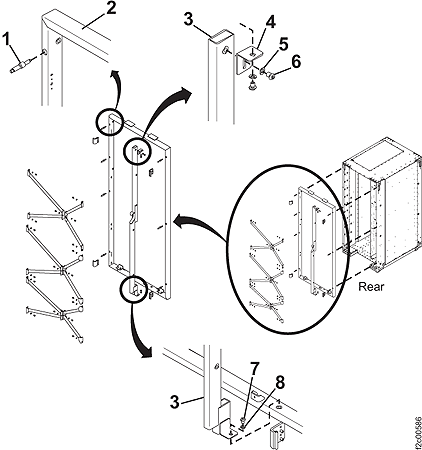
| Index | Part name |
|---|---|
| 1 | Screw |
| 2 | Brace extension frame |
| 2a | Nut, earthquake frame (only present if frame does not have pre-threaded holes) |
| 3 | Vertical brace |
| 4 | Bracket |
| 5 | Washer |
| 6 | Screw |
| 7 | Screw |
| 8 | Washer |
MAP1600 Section-4 (Tailgate access brace)
Before you begin
Procedure
- Remove two bolts and washers that secure the tailgate access brace to the bracket on the brace extension frame. See
Figure 5.
- Remove the bolt and washer that secure the vertical brace to the tailgate access brace.
- Remove the tailgate access brace.
- After the service action is complete, you must reinstall all hardware that was removed to allow service access.
Example
Figure 5. Tailgate access brace (rear
of the rack)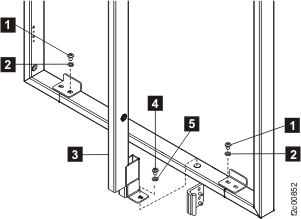
| Index | Part name |
|---|---|
| 1 | Bolt |
| 2 | Washer |
| 3 | Vertical brace |
| 4 | Bolt |
| 5 | Washer |
MAP1600 Section-5 (vertical brace, rear)
Before you begin
(Figure 4) from the rear of the rack (or to swing
it out of the way by pivoting it at the top), perform the procedure in this section.Procedure
- Remove the screw
 and washer
  that secure each V-brace (, , , or ) to the vertical brace. See Figure 6. Figure 6. Earthquake resistance kit V-braces at the rear of the rack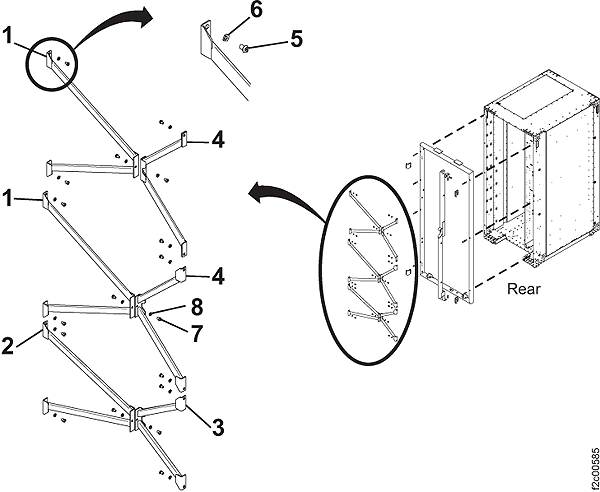
Table 7. Earthquake resistance kit V-braces (rear of the rack) Index Part name 1 V-brace, main, upper 2 V-brace, main, lower 3 V-brace, power, lower 4 V-brace, power, upper 5 Screw 6 Washer 7 Screw 8 Washer - See Figure 4. At the top of the vertical brace , loosen the screw
 that secures the vertical brace to the bracket on the brace extension frame . The vertical brace can be
pivoted on this screw.
that secures the vertical brace to the bracket on the brace extension frame . The vertical brace can be
pivoted on this screw. - At the bottom of the vertical brace, remove the bolt and washer that secure the vertical brace to the tailgate access brace.
- If necessary, at the top of the vertical brace, remove
the screw that secures the vertical brace to
the bracket on the brace extension frame and then remove the vertical
brace.
MAP1600 Section-6 (V-brace, rear)
Before you begin
Procedure
- See Figure 6. Remove the screw and washer ) that secure the V-brace , , , or to the vertical brace.
- The V-brace is hinged where it is attached to the brace extension frame. Swing the V-brace outward on its hinges.
- If necessary, remove the screws and washers that secure the V-brace to the brace extension frame and remove the V-brace.
- After the service action is complete, you must reinstall all hardware that was removed to allow service access.
MAP1600 Section-7 (Storage enclosure [Models 951, 95E] earthquake resistance bracket, rear)
Before you begin
Procedure
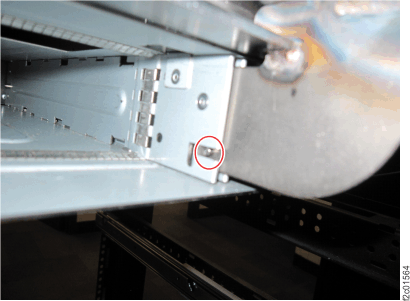
- At the rear of the rack, remove the nylock nut attaching the black bracket to the left and right horizontal rails. See Figure 7.
- Slide the bracket away from the storage enclosure so the middle support disengages the slot. See Figure 8.
- After the service action is complete, you must reinstall all hardware that was removed to allow service access.
Example
Figure 7. Nylock nut for earthquake bracket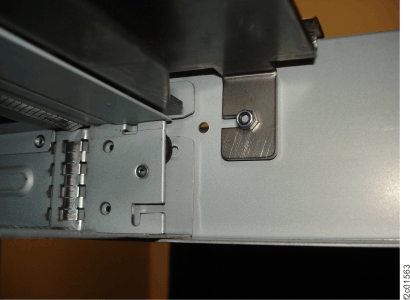
Figure 8. Storage enclosure middle slot