DS8000 Service Documentation Version 6.3.3
MAP1400 HMC is reporting an installation error before serviceable events being created
This MAP guides you to repair a problem that was found during the 'Install Storage Facility' process and continues with the storage facility installation after the problem is repaired.
Before you begin
CAUTION:
Use this MAP only when you are directed
by the Installation instructions or an on-screen message.
MAP1400 Section-1
Procedure
MAP1400 Section-A
About this task
Procedure
MAP1400 Section-B
About this task
Procedure
MAP1400 Section-C
About this task
Procedure
- Ensure the correct CD-ROM or DVD-RAM media is inserted and repeat the operation to perform the 'Field Install Storage Facility'.
- If problems persist, contact your next level of support.
MAP1400 Section-D
About this task
Procedure
- If this installation included multiple storage facility racks, perform a quality check of the
following conditions:
- Ensure that the racks were installed in the correct sequence.
- On each expansion rack, check the Rack 1 serial number (S/N) which appears on a label as shown in the figures below. Ensure that the serial number matches the serial number of Rack-1, indicating which rack the expansion rack must be installed to.
- Ensure that the expansion rack was installed in the position indicated by the rack number label.
- Ensure that all PCIe and SPCN cables were routed to the correct location.
- Ensure that all PCIe and SPCN cables are correctly seated and have not become dislodged during shipment.
- Ensure that all racks have power available to them.
- Go to step 4.
Figure 1. Rack serial number and rack number labels (Models 941, 94E)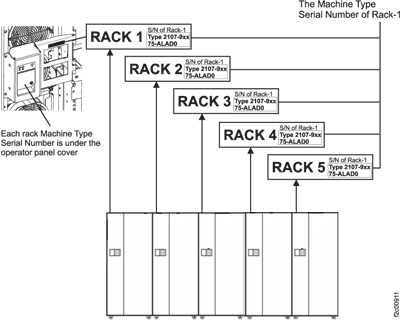 Figure 2. Rack serial number and rack number labels (Models 951, 95E)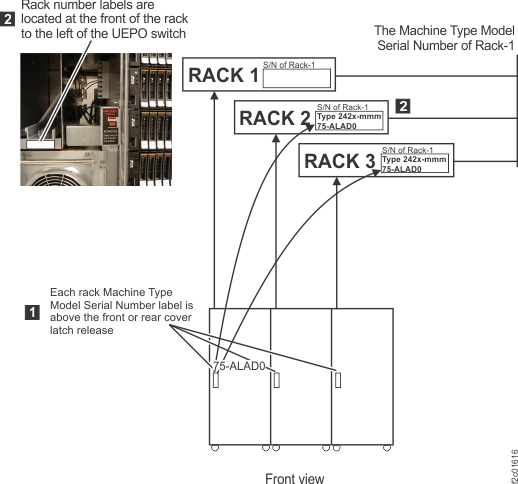
MAP1400 Section-E
About this task
Procedure
- Record any on-screen error messages.
- Contact your next level of support.
MAP1400 Section-F
About this task
Procedure
- Record any on-screen error messages.
- Contact your next level of support.
MAP1400 Section-G
About this task
Procedure
MAP1400 Section-H
About this task
Procedure
MAP1400 Section-J
About this task
Procedure
MAP1400 Section-K
About this task
Procedure
- Record the state of the storage facility as displayed in the Storage Facility Install/Remove panel.
- Contact your next level of support.
MAP1400 Section-L
About this task
Procedure
- Ensure that all service actions on this storage facility initiated from the management console were completed or canceled.
- Ensure that all service actions on this storage facility initiated from an alternative management console were completed or canceled.
- Return to the installation process and repeat the operation to perform the 'Field Install Storage Facility'.
- If the problem persists, then contact your next level of support.
MAP1400 Section-N
About this task
You were sent to this section because one of the following conditions:
- The storage facility was not listed on the Install/Add/Remove panel. Selection of this panel causes the management console to attempt to 'discover' all attached storage facilities. If the new storage facility is not listed, then it is likely that the management console cannot communicate with the service processors in the new storage facility. This problem would be expected only when installing a new (second) storage facility to an existing storage complex.
- One or more managed systems were found in the 'No Connection' state. If a managed system is in the 'No Connection' state, the management console cannot communicate with the service processor in that managed system.
Procedure
- Allow sufficient time for the service processors to
power on and IML. Note: The service processor takes 10 minutes to IML from the time that power is applied to the CEC enclosure.Did you wait up to 10 minutes from switching on (up) the Rack-1 PPS MAIN LINE CB00 (Models 941, 951) to apply rack power?
- Yes, go to the next step.
- No, allow 10 minutes and retry the operation. Return here if you have the same problem.
Figure 3. Location codes for the CEC enclosure (rear view)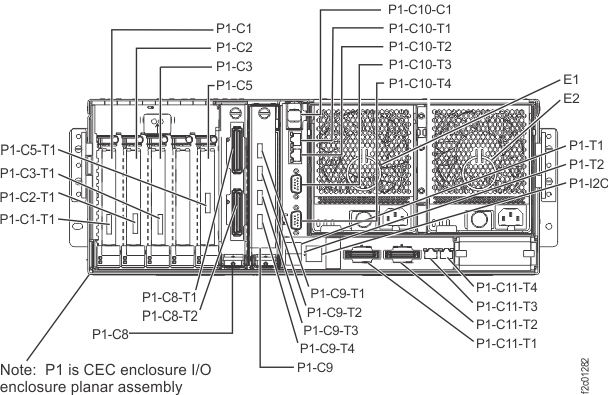
- Verify that all CEC
enclosures in the storage facility being installed have input
power. Check the LEDs on the rear of the CEC enclosure power supplies. Figure 3 locations E1 and E2 shows the various CEC enclosure
locations.Note: The power off state is indicated by the Input power LEDIs the Input power LED
 being lit solid and the DC good (output) LED
  flashing.
Figure 4 shows the CEC enclosure power supply LEDs. lit solid
on one or both CEC enclosure power supplies in each CEC enclosure?Note: A CEC enclosure functions normally with only one of the two power supplies providing power. You can wait to repair the failing power supply until after the SF installation is complete.
flashing.
Figure 4 shows the CEC enclosure power supply LEDs. lit solid
on one or both CEC enclosure power supplies in each CEC enclosure?Note: A CEC enclosure functions normally with only one of the two power supplies providing power. You can wait to repair the failing power supply until after the SF installation is complete.- Yes, go to the next step.
- No, go to MAP1400 Section-P.
Figure 4. CEC enclosure power supply LEDs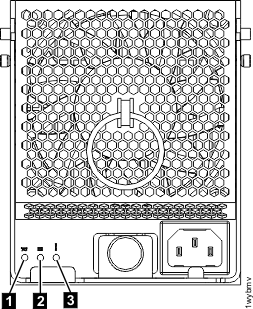
- If this is SF2 (the second storage facility in
the storage complex), then verify that the private network cables
were installed between SF1 and SF2 Ethernet switches. See Figure 5 and Figure 6. Figure 5. 8-port Ethernet switch port designations (SW1, SW2-Tx) Model 941 and 951
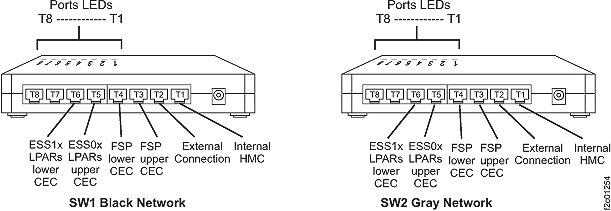 Figure 6. Connectivity between storage facilities for HMC and both 8-port Ethernet switchesAre the cables connected?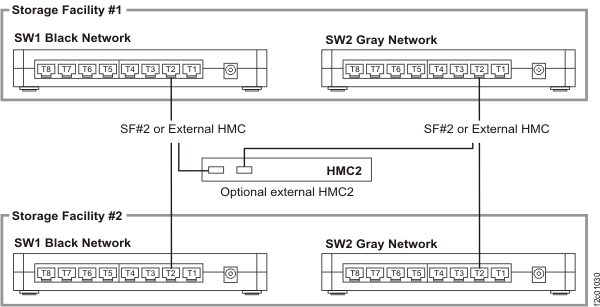
- Yes, go to the next step.
- No, connect the cables and retry the Install action.
- For the new storage facility that is being
installed, verify that power is available for the service processor functions (CEC enclosure service processor card P1-C11) in each of the CEC
enclosures.
Check the green output power (DC power good) LED
of the
CEC power supplies (Figure 4) for each CEC enclosure. Power is available if the LED
is lit solid ("on") or flashing ("standby").Is power available to both of the service processors?
- Yes, go to the next step.
- No, go to MAP1400 Section-R.
MAP1400 Section-P
About this task
Procedure
MAP1400 Section-Q
About this task
Procedure
MAP1400 Section-R
About this task
Procedure
MAP1400 Section-S
About this task
CAUTION:
If you Click on the NO button
in answer to the question "Do you want to continue with the Installation
Process?" then the Field Install Storage Facility process terminates.
The automated process must then be run again from the start to complete
the installation.