This section contains rack power and cooling FRUs that
have LED indicators. Each listed assembly is shown with a description
of its LEDs. Although LED indicators may indicate a failure, they
should not be used as a starting point for a repair.
Rack power and cooling FRUs with LEDs
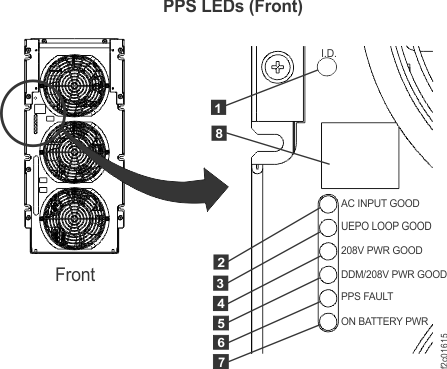
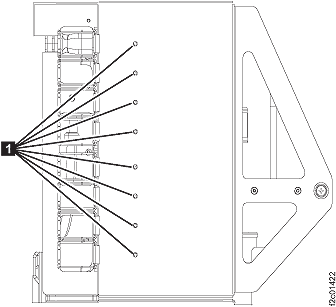
LEDs on the primary power supply (front)
Figure 1. LEDs on the PPS (front)
Table 2. Interpreting
LEDs on the primary power supply (front)| Index |
LED Function |
Color |
LED Off |
LED On |
LED Flash |
|---|
| 1 |
Identify for primary power supply |
Amber |
Normal |
n/a |
Identify |
| 2 |
AC input good |
Green |
missing input or CB00 off |
Normal |
n/a |
| 3 |
UEPO loop good |
Green |
PPS off or UEPO switch is tripped |
Normal |
n/a |
| 4 |
208VDC output power good |
Green |
PPS off |
Normal |
n/a
See note 3 |
| 5 |
DDM output power good |
Green |
PPS off |
Normal |
n/a
See note 3 |
| 6 |
PPS fault |
Amber |
Normal |
error
See note 1 |
n/a |
| 7 |
On battery |
Amber |
Normal |
error
See note 2 |
n/a |
| 8 |
Status display (see MAP2340 Codes on the PPS status display) |
n/a |
n/a |
n/a |
n/a |
Notes: - Indicates one of the following:
- The PPS has
detected an internal error in which case the status display 8 should
be displaying a code and an open serviceable event should
exist.
- The PPS cannot
communicate with the other PPS in the
same rack, or the other PPS has an
error.
- During a repair of the failing PPS, the
FRU Identify LED 1 is used to determine
the failing PPS.
- Both customer mainline power inputs to this rack have been lost
and the PPSs
are using rack battery power to safely shutdown the storage facility.
- Indicates one of the following:
- PPS firmware is being updated.
- PPS PBCM corruption has occurred (call next level of support).
|
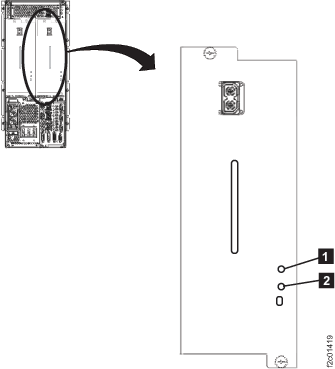
LEDs on the 208VDC power module
Figure 2. LEDs on the 208VDC power module
Table 3. Interpreting LEDs on the 208 VDC power module| Index |
LED Function |
Color |
LED Off |
LED On |
LED Flash |
|---|
| 1 |
Identify |
Amber |
Normal |
n/a |
Identify |
| 2 |
208VDC
output |
Green |
PPS
off |
Normal |
n/a |
| Amber |
Fault |
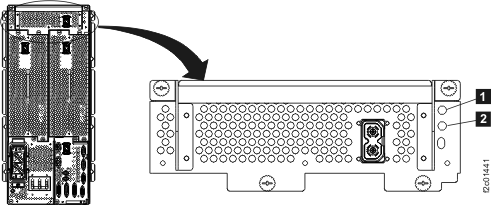
LEDs on the booster power module
Figure 3. LEDs on the booster power module
Table 4. Interpreting LEDs on the booster power module| Index |
LED Function |
Color |
LED Off |
LED On |
LED Flash |
|---|
| 1 |
Identify |
Amber |
Normal |
n/a |
Identify |
| 2 |
208VDC
output |
Green |
PPS
off |
Normal |
n/a |
| Amber |
Fault |
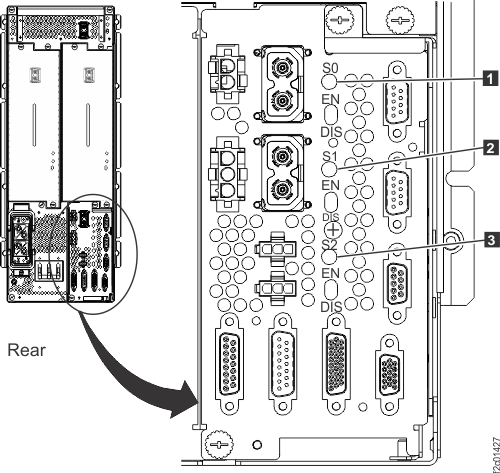
LEDs on the sequencer module
Figure 4. LEDs on the PPS sequencer module
Table 5. Interpreting LEDs on the sequencer module| Index |
LED Function |
Color |
LED Off |
LED On |
LED Flash |
|---|
| 1 |
Main 208VDC
output |
Green |
PPS
off |
Normal |
n/a |
| Amber |
Fault |
| 2 |
Protected 208
VDC output 0 |
Green |
Normal |
| Amber |
Fault |
| 3 |
Protected 208
VDC output 1 |
Green |
Normal |
| Amber |
Fault |
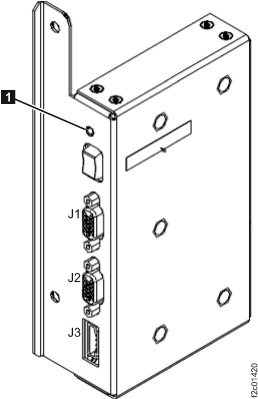
LEDs on the Power Distribution Unit
Figure 5. Output power indicator (LED) for a power distribution
unit
Table 6. Interpreting LEDs on
the power distribution unit| Index |
LED Function |
Color |
LED Off |
LED On |
LED Flash |
|---|
| 1 |
Output power |
Green |
Off1 |
Normal |
n/a |
Note 1: Each power output port
is protected by a non-replaceable fuse. If only one output power LED
is off, there is a problem with the power distribution unit.
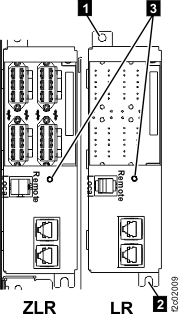
LED on the local remote switch card
Figure 6. Local remote card cables
Table 7. Interpreting LEDs on the
local remote switch card| Index |
LED Function |
Location |
Color |
LED Off |
LED On |
LED Flash |
|---|
| 3 |
Identify |
C6 |
Amber |
Normal |
N/A |
Identify |
LEDs on the rack identity card
Figure 7. LEDs on the rack identity card
Table 8. Interpreting
LEDs on the rack identity card| Index |
LED Function |
Location |
Color |
LED Off |
LED On |
LED Flash |
|---|
| 1 |
Identify |
C5 |
Amber |
Normal |
N/A |
Identify |
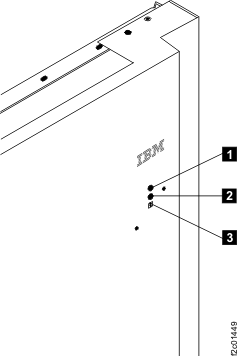
LEDs
on the rack operator panel
assembly
Figure 8. Rack operator panel LEDs on
upper right of rack front cover
Table 9. Interpreting LEDs
on the rack operator panel
assembly| Index |
LED Function |
Color |
LED Off |
LED On |
LED Flash |
|---|
| 1 |
Line cord 1 |
Green |
1 |
2 |
3 |
| 2 |
Line cord 2 |
Green |
1 |
2 |
3 |
| 3 |
Identify or System Attention |
Amber |
Normal |
Attention4
(Rack-1
only) |
Identify4 |
Notes: - Off under any of the following conditions:
- Customer power is not present
- Standby power is present and the Remote Force Power Off is not
active
- The corresponding RPC or PPS is fenced
- The LED is broken
- On solid when PPS DDM power
is on.
- Flashes slow (1 flash per 2 seconds) when a PPS is in
Standby, a PPS is
not fenced, or the Remote Force Power Off switch is active. Flashes
rapidly (2 flashes per second) during the PPS power
ON, power OFF, and Force Power OFF sequences.
- This LED is used for the following
purposes:
- For Rack-1 only:
If the LED is lit solid, it indicates Attention
status, which means that one or more open serviceable events needing
repair exist.
When all serviceable events have been closed
or cancelled, the LED changes to off.
When both attention and
identify status exist on Rack 1, the identify indication is shown
and the LED flashes.
- For all racks:
If the LED is flashing, it indicates Identify
status, which means the service representative is replacing a part
that was selected from a serviceable FRU list or from the Parts
Exchange menu option.
Note: Most, but not all, FRUs have identify
indicators. The "light path" identify LEDs are a hierarchy of LEDs
that can identify the rack, enclosure, FRU, and even the FRU connector
for which a cable is connected.
|
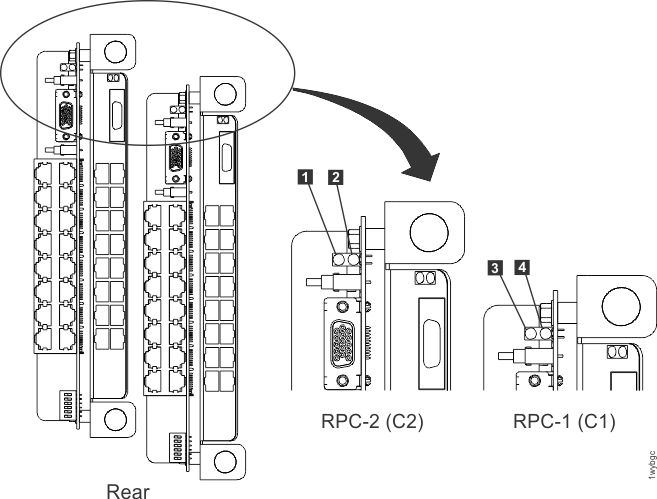
LEDs on the RPC cards
Figure 9. LEDs on the RPC
cards
Table 10. Interpreting LEDs
on the RPC cards| Index |
LED Function |
Location |
Color |
LED Off |
LED On |
LED Flash |
|---|
| 1 |
Operational |
C2 |
Green |
fenced, not booted, or no input power |
operational |
n/a |
| 2 |
Identify |
C2 |
Amber |
Normal |
1 |
Identify |
| 3 |
Operational |
C1 |
Green |
fenced, not booted, or no input power |
operational |
n/a |
| 4 |
Identify |
C1 |
Amber |
Normal |
1 |
Identify |
Notes: - When this LED is on solid, the flash memory in the other RPC card is corrupted.
|