DS8000 Service Documentation Version 6.3.3
Routing and connecting customer cables to the storage facility
Procedure
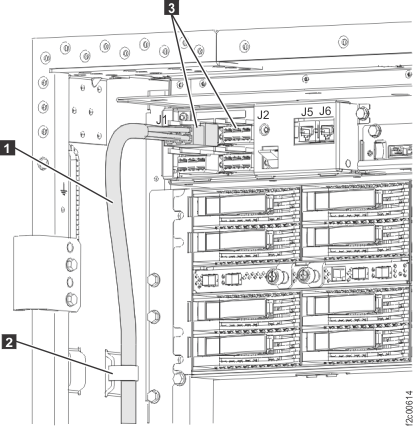
- Route the remote power control cables 1 from
each host up through the tailgate to the ZLR remote power control
card connectors 3 . Use cable ties to
fasten the cable to the frame 2 . See Figure 1. Figure 1. Remote power control cables from host to ZLR card
 Attention: The remote power control feature will be enabled in the next step. Remind your customers that they must test it.
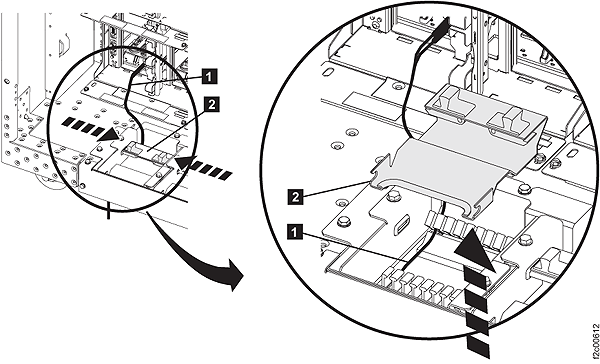
 - In the tailgate, squeeze the black release levers 2 ,
pivot the retention bracket up and then remove it. Figure 2. Tailgate cable and Fibre Channel cable retention
- This step provides information useful for connecting
customer host cables to the I/O enclosure host adapter card ports. Figure 3. DS Storage Manager HA card port ID and location code
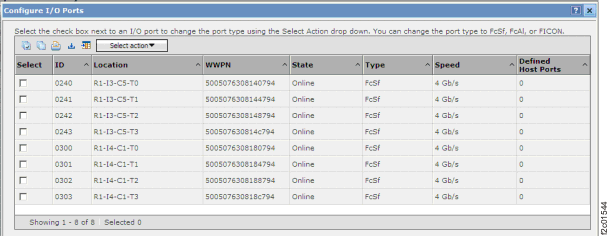 Figure 4. DS CLI host adapter card port ID
dscli> lsioport -dev IBM.2107-75RA271 Date/Time: July 13, 2010 2:40:33 PM PDT IBM DSCLI Version: 5.4.2.460 DS: IBM.2107-75RA271 ID WWPN State Type topo portgrp =============================================================== I0200 50050763091006FE Online Fibre Channel-SW SCSI-FCP 0 I0201 50050763091046FE Online Fibre Channel-SW SCSI-FCP 0Figure 5. Location codes for device adapter and host adapter cards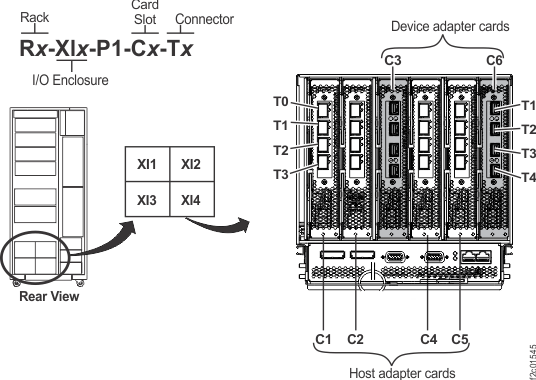
Table 1. Rack-1 rear view of I/O enclosure HA Port locations and IOPORT numbers R1-XI1 I/O Enclosure R1-XI2 I/O Enclosure HA Card Slot C1 HA Card Slot C2 DA Card Slot C3 HA Card Slot C4 HA Card Slot C5 DA Card Slot C6 HA Card Slot C1 HA Card Slot C2 DA Card Slot C3 HA Card Slot C4 HA Card Slot C5 DA Card Slot C6 C1-T0
I0000C2-T0
I0010C4-T0
I0030C5-T0
I0040C1-T0
I0100C2-T0
I0110C4-T0
I0130C5-T0
I0140C1-T1
I0001C2-T1
I0011C4-T1
I0031C5-T1
I0041C1-T1
10I01C2-T1
I0111C4-T1
I0131C5-T1
I0141C1-T2
I0002C2-T2
I0012C4-T2
I0032C5-T2
I0042C1-T2
I0102C2-T2
I0112C4-T2
I0132C5-T2
I0142C1-T3
I0003C2-T3
I0013C4-T3
I0033C5-T3
I0043C1-T3
I0103C2-T3
I0113C4-T3
I0133C5-T3
I0143R1-XI3 I/O Enclosure R1-XI4 I/O Enclosure HA Card Slot C1 HA Card Slot C2 DA Card Slot C3 HA Card Slot C4 HA Card Slot C5 DA Card Slot C6 HA Card Slot C1 HA Card Slot C2 DA Card Slot C3 HA Card Slot C4 HA Card Slot C5 DA Card Slot C6 C1-T0
I0200C2-T0
I0210C4-T0
I0230C5-T0
I0240C1-T0
I0300C2-T0
I0310C4-T0
I0330C5-T0
I0340C1-T1
I0201C2-T1
I0211C4-T1
I0231C5-T1
I0241C1-T1
I0301C2-T1
I0311C4-T1
I0331C5-T1
I0341C1-T2
I0202C2-T2
I0212C4-T2
I0232C5-T2
I0242C1-T2
I0302C2-T2
I0312C4-T2
I0332C5-T2
I0342C1-T3
I0203C2-T3
I0213C4-T3
I0233C5-T3
I0243C1-T3
I0303C2-T3
I0313C4-T3
I0333C5-T3
I0343Table 2. Rack-2 rear view of I/O enclosures HA Port locations and IOPORT numbers R2-XI1 I/O Enclosure R2-XI2 I/O Enclosure HA Card Slot C1 HA Card Slot C2 DA Card Slot C3 HA Card Slot C4 HA Card Slot C5 DA Card Slot C6 HA Card Slot C1 HA Card Slot C2 DA Card Slot C3 HA Card Slot C4 HA Card Slot C5 DA Card Slot C6 C1-T0
I0400C2-T0
I0410C4-T0
I0430C5-T0
I0440C1-T0
I0500C2-T0
I0510C4-T0
I0530C5-T0
I0540C1-T1
I0401C2-T1
I0411C4-T1
I0431C5-T1
I0441C1-T1
I0501C2-T1
I0511C4-T1
I0531C5-T1
I0541C1-T2
I0402C2-T2
I0412C4-T2
I0432C5-T2
I0442C1-T2
I0502C2-T2
I0512C4-T2
I0532C5-T2
I0542C1-T3
I0403C2-T3
I0413C4-T3
I0433C5-T3
I0443C1-T3
I0503C2-T3
I0513C4-T3
I0533C5-T3
I0543R2-XI3 I/O Enclosure R2-XI4 I/O Enclosure HA Card Slot C1 HA Card Slot C2 DA Card Slot C3 HA Card Slot C4 HA Card Slot C5 DA Card Slot C6 HA Card Slot C1 HA Card Slot C2 DA Card Slot C3 HA Card Slot C4 HA Card Slot C5 DA Card Slot C6 C1-T0
I0600C2-T0
I0610C4-T0
I0630C5-T0
I0640C1-T0
I0700C2-T0
I0710C4-T0
I0730C5-T0
I0740C1-T1
I0601C2-T1
I0611C4-T1
I0631C5-T1
I0641C1-T1
I0701C2-T1
I0711C4-T1
I0731C5-T1
I0741C1-T2
I0602C2-T2
I0612C4-T2
I0632C5-T2
I0642C1-T2
I0702C2-T2
I0712C4-T2
I0732C5-T2
I0742C1-T3
I0603C2-T3
I0613C4-T3
I0633C5-T3
I0643C1-T3
I0703C2-T3
I0713C4-T3
I0733C5-T3
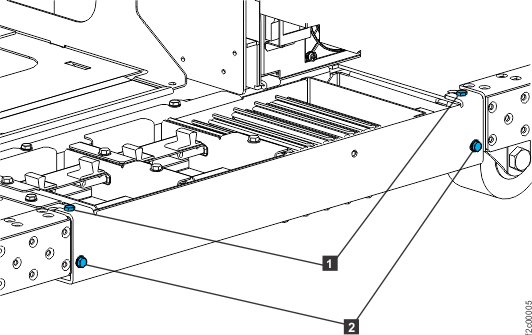
I0743 - Reinstall the tailgate brackets in
all frames using the screws 2 removed
earlier. Tighten all four screws 1 and 2 .
See Figure 6 Figure 6. Tailgate frame bracket