DS8000 Service Documentation Version 6.3.3
Routing and connecting the Rack-2 SPCN and PCIe cables
Procedure
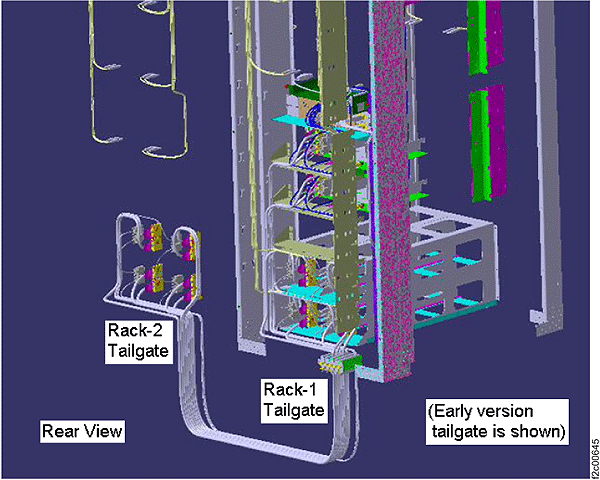
- This step shows an overview of the Rack-2
to Rack-1 routing of the PCIe and SPCN cables. Do not route
or connect the cables until directed in later steps.
Figure 1. Mechanical routing of the PCIe and SPCN cables (rack-to-rack)
- On a raised floor, the cables are run down through the tile
cutouts and underneath the floor.
- On a non-raised floor, the cables are run beneath the racks.
- Do the following:
- At the rear of Rack-2 uncoil the thick PCIe cables
that are stored above the I/O enclosures.
- The loose end of each PCIe cable has a label that identifies
the Rack-1 CEC enclosure (XC1, XC2) it will be routed to.
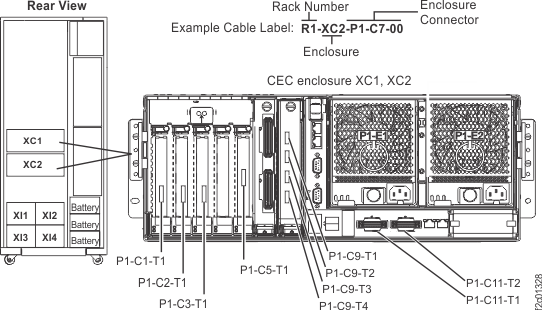
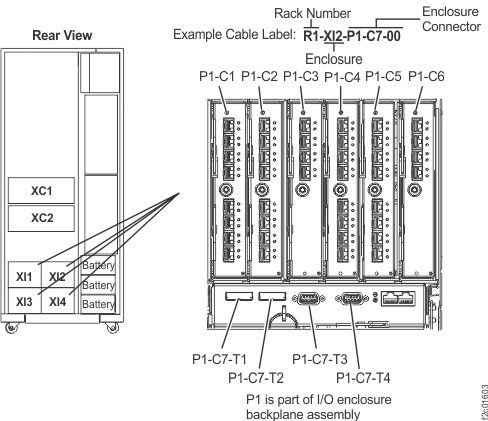
- Use Figure 2 and Figure 3 to translate the label
location code to the physical location.
Figure 2. CEC enclosure locations on cable labels (rear view)
Figure 3. I/O enclosure locations on cable
labels
- Route the PCIe cables
inside of Rack-2. See Figure 4.
- Route the PCIe cables on the left side of the rack through
slot 1.
- Route the PCIe cables on the right side of the rack through
slot 6.
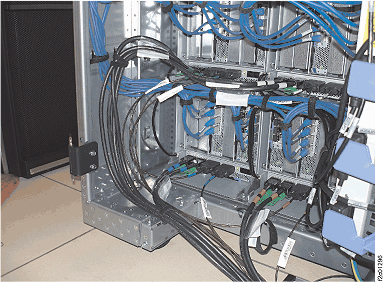
Figure 4. PCIe and SPCN cable routing through Rack-2 tailgate
- Do the following for the SPCN cables:
- At the rear of Rack-2 uncoil the thin SPCN cables that
are stored above the I/O enclosures.
- The loose end of each SPCN cable has a label that identifies
the Rack-1 CEC enclosure (XC1, XC2) or I/O enclosure (XI1, XI2, XI3
or XI4) it will be routed to.
- Use Figure 2 and Figure 3 to translate the label
location code to a physical location.
- Route the SPCN cables.
- For cable routing inside of the rack, see Figure 5.
- Route the SPCN cables on the left side of the rack through
slot 2.
- Route the SPCN cables on the right side of the rack through
slot 5.
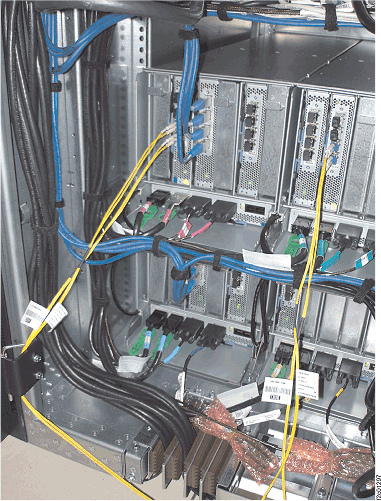
Figure 5. PCIe and SPCN cable routing through the Rack-1 tailgate
- Plug the SPCN cables into
the indicated connector on the destination CEC and I/O enclosures.
Figure 2 and Figure 3 displays the connector
locations.
- Plug the PCIe cables into the
indicated connector on the destination CEC enclosure. Figure 2 displays the connector
locations.
Note: The four PCIe connectors on the P1-C9
card that the expansion rack PCIe cables connect to are turned 180
degrees from the connectors on the P1-C1, C2, C3 and C5 cards that
the Rack-1 PCIe cables connect to.
- Reinstall the tailgate cable retention clamps to secure
the PCIe and
SPCN cables in the tailgate.
- Do you have additional expansion racks to install
on this storage facility?