DS8000 Service Documentation Version 6.3.3
Routing and connecting the FC-AL cables
About this task
Note: If an FC-AL cable is
damaged, you can use the point-to-point cabling diagrams to determine the other end of the cable.
See Point-to-point cabling diagrams - FC-AL cables. Several FC-AL cables are tightly bundled together so
it is difficult to physically trace an individual FC-AL cable from end to end.
Procedure
- Are you installing Rack-2?
- Yes, the blue FC-AL cables are already routed within Rack-2, go to step 5.
- No, the blue FC-AL cables must be routed between the racks, go to the next step.
- Do the following:
- Find and uncoil the blue FC-AL cables that are coiled at the top front and rear of the rack. Do not remove the black protective cable connector covers.
- Use Table 1 to
determine the destination rack number for these cables.
Table 1. Destination rack for cable bundles If you are installing rack: Route the loose end of the FC-AL cable bundles to rack: 3 1 4 2 5 3 - Find the rack number label located where the cable assembly is bundled together, within 60 cm (24 in.) of the connectors. See Figure 1.
- Find the enclosure location code labels at the loose ends of each FC-AL cable bundle. Each bundle might have four sub-bundles that go to either two storage enclosures or two I/O enclosures.
- Use Figure 2 to translate the label location to a physical location. The label identifies the I/O enclosure or storage enclosure number location code to where you are routing the cables.
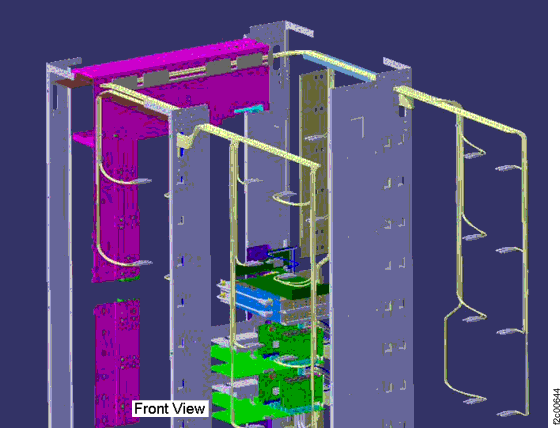
- Route each cable bundle to the destination rack through the rack to rack holes near the rack cover upper hinges. Do not connect the cables at this point.
- Use existing cable trays and cable ties. Refer
to Figure 2 and Figure 4. Notes:
- FC-AL point-to-point cable connection diagrams for various rack models and configurations are in the service information center. (Go to Reference > Cable diagrams > FC-AL cables > Point-to-point cabling diagrams for the FC-AL cables.)
- The management console cannot be used yet, but the service information center is available on the IBM® DS8000® series Service Documents CDROM in the ship group.
Figure 1. Rack number label on FC-AL cable assembly
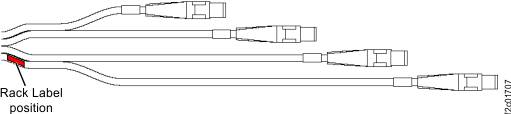
Figure 2. Cable labels, storage and I/O enclosure locations
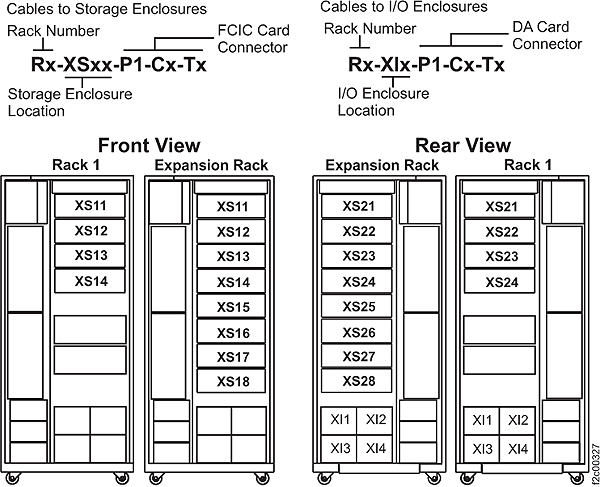
Figure 3. Cable labels to I/O Enclosures and Storage Enclosures
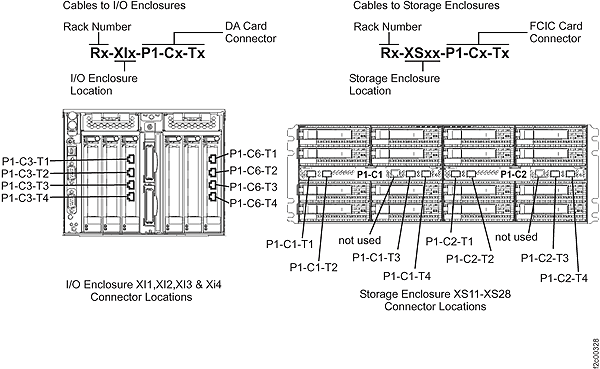
Figure 4. Mechanical routing of the FC-AL cables (rack-to-rack)
- After each cable bundle has been routed to its destination enclosure, remove the black rubber protective connector covers.
- Plug the FC-AL cables into the connectors on the DA cards
in the I/O enclosures or FCIC cards in the storage enclosures as indicated
on the cable labels. Refer to Figure 3 for
connector locations. Note: Do not discard the connector covers, you can store them in the Rack-1 documents enclosure (front upper left).
- Do you have additional expansion
racks to install on this storage facility?
- Yes, install the next expansion rack. Return to Routing and connecting the interrack cables to one expansion rack at a time.
- No, continue with Installing the interrack decorative covers kit.