DS8000 Service Documentation Version 6.3.3
Positioning Rack-1
Before you begin
About this task
DANGER
HEAVY EQUIPMENT: PERSONAL INJURY OR EQUIPMENT DAMAGE MAY
RESULT IF MISHANDLED (D006)
Procedure
- You must ensure that each expansion rack is installed to
the base rack (Rack-1) that it was originally configured with. Note: If expansion racks for two storage facilities are accidentally intermixed, a successful installation will not be possible.
- Each rack has a small label
 with its rack S/N above the left
rear door latch. See Figure 1.
with its rack S/N above the left
rear door latch. See Figure 1. - Each rack has a large label
 with its rack number
(position in the storage facility) and the S/N of the Rack-1 it must
be installed to. The label is to the right
of the UEPO switch. See Figure 1.
with its rack number
(position in the storage facility) and the S/N of the Rack-1 it must
be installed to. The label is to the right
of the UEPO switch. See Figure 1.
Figure 1. Rack serial number and rack number labels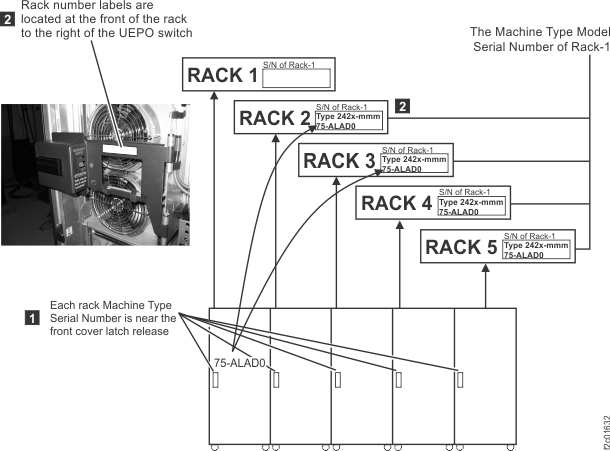
- Each rack has a small label
- Install the wheel chocks (located in the ship group) on all
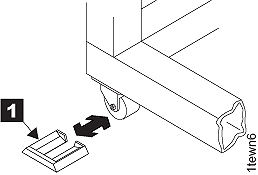
four casters. Refer to Figure 2. Figure 2. Wheel (wedge) chocks
- Open the right rear cover (trained service personnel
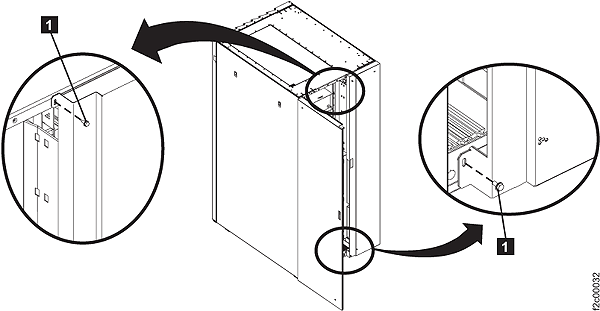
access area only). Use a 3mm hex wrench to remove the two screws . Note: The screws must be reinstalled when the cover is closed to prevent customer access.Figure 3. Removing retaining screws on right rear machine cover
- Locate the 208VDC bus bar gate. Refer to Figure 4. Remove the two screws and swing it out to the service position
 . Figure 4. 208VDC bus bar gate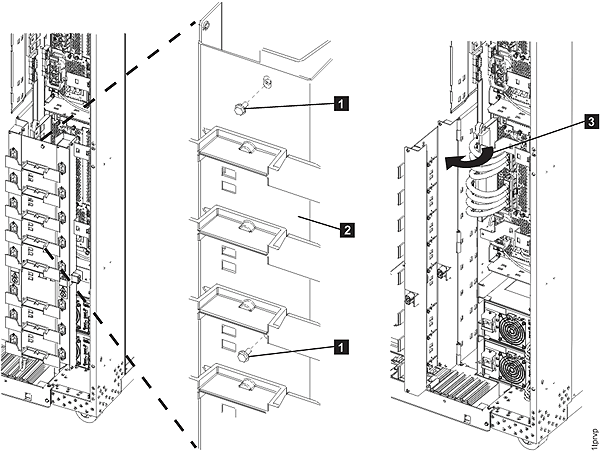
- Remove the tailgate frame bracket. Remove two screws as shown in Figure 5. Loosen but do not
remove the two top screws . Slide the bracket out. Figure 5. Tailgate frame bracket