DS8000 Service Documentation Version 6.3.3

Connecting a new storage facility to an existing storage complex

Before you begin

DANGER
An electrical outlet that is not correctly wired could place hazardous voltage on the metal parts of the system or the devices that attach to the system. It is the responsibility of the customer to ensure that the outlet is correctly wired and grounded to prevent an electrical shock. (D004)

About this task

This section provides the additional steps to connect a new storage facility to an existing storage facility (SF) complex.
Attention: If you will be installing more than one new storage facility to an existing storage facility complex, completely install one storage facility at a time.

Procedure

  1. Ensure the code level of the existing storage facility is already at a compatible level or same level as the new storage facility code levels.

    When the installation is complete, the storage facilities and HMCs must be at the same code levels.

  2. The DS8000 private network must not share any physical connections with the customer network.

    The storage facility uses two private networks that must not be cross connected to the customer network.

    All cables for one private network are color coded or labeled as" black". All cables for the other private network are color coded or labeled as "gray".

    Each private network must be cabled point to point between either of the following:
    • the Rack-1 internal Ethernet switches in two separate storage facilities.
    • the Rack-1 internal Ethernet switches in storage facility 1 to an external management console.

    The management consoles run DHCP servers that automatically assign network addresses to the Ethernet ports on the private networks.

    The security, operation, error detection, error reporting and problem isolation procedures of the private network are designed for dedicated point-to-point connections.

  3. Locate the two Ethernet cables that will interconnect the new storage facility and the existing storage facility in this storage complex that contains management console 1 (HMC1).
    Notes:
    • The ship group should contain a 31 meter (101 feet) black Ethernet cable and a 31 meter gray cable.
      The black cable is P/N 22R1798. The gray cable is P/N 22R1799.
    • Optionally, if these cables are not long enough to reach, have the customer provide two Ethernet cables that are straight 4-pair UTP CAT 5E with RJ-45 jacks. The maximum length of the cables should be 100 meters (328 feet).

      One cable must be labeled as "Black" on both ends. The other cable must be labeled as "Gray". All private network cables are marked Black or Gray to visually separate the redundant network cabling.

  4. Route the black and gray Ethernet cables between the two storage facilities.
    1. At the rear of each Rack-1, route the Ethernet cable through the tailgate and up either the left or right side of the rack alongside the blue FC-AL cables. Use cable ties to secure the cables.
    2. Do not connect the cables until you are directed to do so in the next steps.
  5. At the rear of the new Rack-1 you are installing, connect the black Ethernet cable as follows:
    1. For 16-port Ethernet switches, connect the black Ethernet cable to the upper Ethernet switch (SW1) port T16.
      Figure 1. Ethernet cable (Black) to upper 16-port Ethernet switch (SW1)
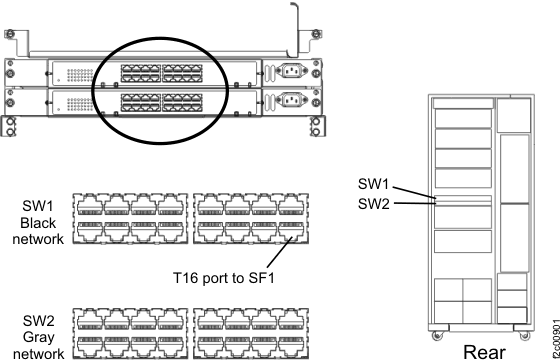
      Black Ethernet cable to upper Ethernet switch SW1
    2. For 8-port Ethernet switches, connect the black Ethernet cable to left Ethernet switch (SW1) port T2. See Figure 2.
      Figure 2. Ethernet cable (Black) to left 8-port Ethernet switch (SW1)

      Ethernet cable (Black) to left 8-port Ethernet switch (SW1)
  6. At the rear of the new Rack-1 you are installing, connect the gray Ethernet cable as follows:
    1. For 16-port Ethernet switches, connect the gray Ethernet cable to the lower Ethernet switch (SW2) port T16. See Figure 3
      Figure 3. Ethernet cable (Gray) to lower 16-port Ethernet switch (SW2)
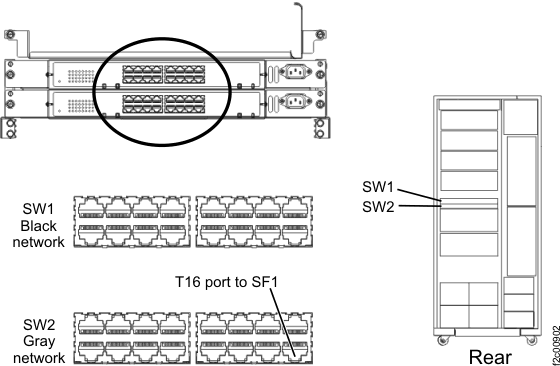
      Gray Ethernet cable to lower Ethernet switch SW2
    2. For 8-port Ethernet switches, connect the gray Ethernet cable to the right Ethernet switch (SW2) port T2. See Figure 4.
      Figure 4. Ethernet cable (Gray) to right 8-port Ethernet switch (SW2)

      Ethernet cable (Gray) to right 8-port Ethernet switch (SW2)
  7. At rear of the existing Rack -1 in SF1, do the following:
    1. For 16-port Ethernet switches, connect the black Ethernet cable to the upper Ethernet switch (SW1) port T15. See Figure 5
      Figure 5. Black Ethernet cable connection to upper 16-port Ethernet switch (SW1)
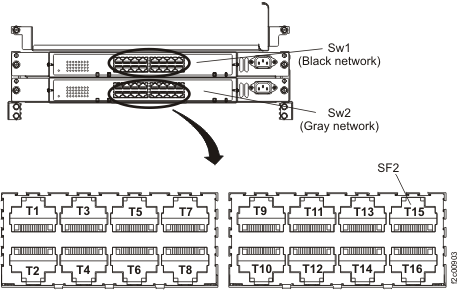
      Black Ethernet cable connection to upper Ethernet switch (SW1)
    2. For 8-port Ethernet switches, connect the black Ethernet cable to left Ethernet switch (SW1) port T2. See Figure 6.
      Figure 6. Ethernet cable (Black) to left 8-port Ethernet switch (SW1)
      Ethernet cable (Black) to left 8-port Ethernet switch (SW1)
  8. At rear of the existing Rack-1 in SF1, connect the gray Ethernet cable as follows:
    1. For 16-port Ethernet switches, connect the gray Ethernet cable to the lower Ethernet switch (SW2) port T15. See Figure 5.
    2. For 8-port Ethernet switches, connect the gray Ethernet cable to the right Ethernet switch (SW2) port T2. See Figure 4.
  9. Continue with Powering on and verifying the storage facility.