Note: If
the Large File Transfer (the 10th System Check Type status from the top) is FAILED, this
System Check Type cannot be displayed.
Procedure
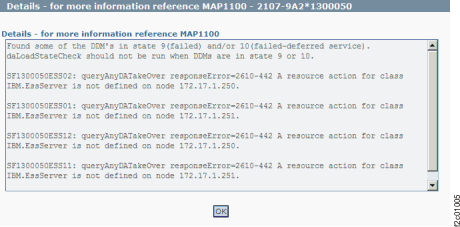
Figure 1 is an example
of the detail window for the DA (device adapter card) load state (in
this example, an error condition is shown).
Figure 1. Window: Device
adapter load state details
Description: A resource that is associated with
the DA is not in the expected state.
Action: Display and repair any open related serviceable events. If there are none, contact your next level of support. The next level of support must remotely connect to repair this condition.
Next level of support only: Check the return code
for the command /usr/lpp/diagnostics/bin/dacheckloadstate
-s on each LPAR.
Normal return code values:
0: All adapters, arrays, pdisks, enclosures, loops, and spares are in a good
state. DA code update is allowed.
Error return code values:
1: An owned device adapter is not in the working state.
2: An array is not in good state.
3: No pdisks are shown by issdload -s
4: Not all pdisks on the device adapter are available.
5: A pdisk is not in a good state.
6: A storage enclosure is not in a good state.
7: There are no device adapters available.
8: There is a device adapter loop problem.
9: Invalid input parameters to dacheckloadstate; contact next level of support
10: There are insufficient spares on the device adapter pair.
15: A storage enclosure power supply is not installed or is in a bad state.
28: Failed to run dacheckloadstate command on lpar.